Check the producer’s output stock first. No goods waiting? Investigate production and inputs. Goods waiting but vehicles empty? Check station coverage, the vehicle’s cargo compatibility and loading settings. Then confirm the destination accepts that cargo.
Jump to a section
Check these in order
Tick each check as you go. Ticks reset when you reload.
See what to inspect
Read the stocks before buying vehicles
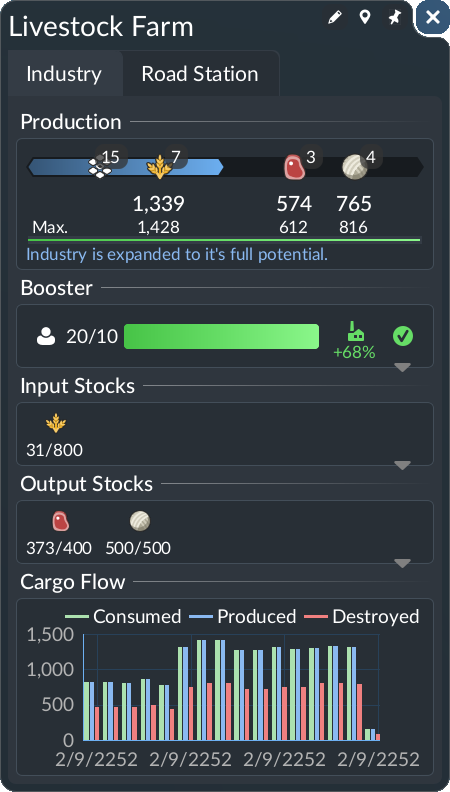
Source image; not a SimGrove play-test. Interface may differ by version or platform.
- Input — The input row shows 31/800.
- Output — The two output rows show 373/400 and 500/500. Goods exist in this pictured industry.
- Next check — This still image does not show a truck collecting anything. Inspect collection before concluding that production is the problem.
Goods are waiting, but the truck leaves empty
The situation. Suppose your producer has output stock, but a truck completes the pickup visit with no cargo.
Separate stock from pickup
Check the exact cargo icon in the output row. The screenshot above is a reading example, not a record of this hypothetical failure.
Follow one truck
Compare the cargo it can carry with the cargo you want it to collect. Inspect the pickup stop and its loading selection.
Test one correction
Change only the mismatch you found, then observe that same truck on another pickup and delivery attempt.
What would count as a useful result?
Confirm cargo aboard after pickup and delivery at the intended consumer. A falling stock count alone is not sufficient proof.
Evidence to keep: Capture the output row, the truck cargo panel and the pickup settings. If the truck is still empty, use the station coverage guide next.
Read the producer before the route
The industry window shows production rules and input/output stocks. Some producers need incoming materials; raw-material industries can produce without those inputs. Produced goods remain at the industry until a suitable, correctly configured line collects them.
Check the destination’s actual needs
The official manual distinguishes raw materials, intermediate goods, boosters and end products. A familiar-looking building is not enough evidence that it wants your cargo. Use the in-game information to identify a matching consumer rather than relying on a remembered Transport Fever 2 chain.
Sources & review notes
Reviewed against the linked documentation on 3 November 2026. This is a source-based guide, not an in-game test report. Planning and diagnostic suggestions are SimGrove’s editorial recommendations. Features may change with updates.
Something changed? Send a correction →