Select the line and read the warning on the failing segment. Check the stop order and the return path. If the vehicle can reach the stop but waits there, inspect its loading and departure settings before rebuilding the route.
Jump to a section
Check these in order
Tick each check as you go. Ticks reset when you reload.
See what to inspect
Match the stop list to the map
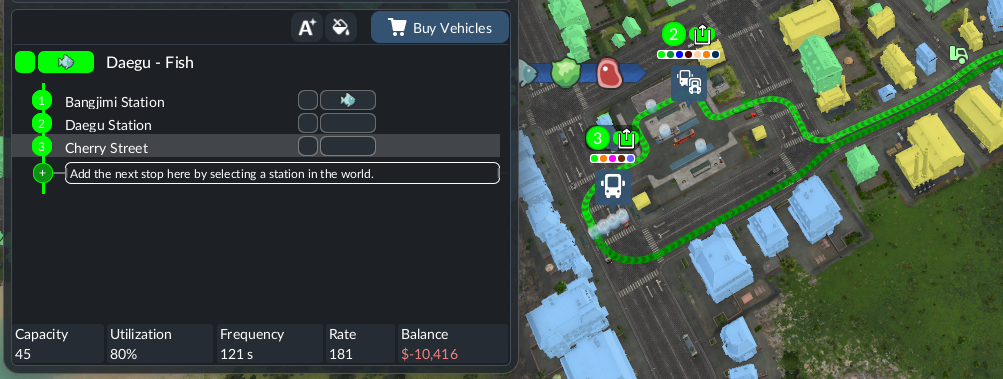
Source image; not a SimGrove play-test. Interface may differ by version or platform.
- List — Cherry Street is selected as stop 3.
- Map — The green overlay lets you compare the route with the listed stops.
- Limit — A visible route alone does not prove that the vehicle is collecting the intended cargo.
The vehicle reaches the stop and then waits
The situation. Suppose a vehicle reaches a stop but does not depart. You suspect a broken road or track.
Record the actual state
Note whether there is a connection warning or whether the vehicle is waiting to load. These observations lead to different checks.
Inspect the departure choice
If it is waiting for a full load, compare that requirement with the cargo currently available. On a test copy, try departure with the available load.
Observe beyond departure
Watch the next stop and the return leg. If a connection warning remains, investigate that segment rather than treating departure as a complete fix.
What would count as a useful result?
Departing after the rule change supports a loading-wait explanation. It does not prove that the route is profitable or that every segment works.
Evidence to keep: Save the waiting state, departure rule and next-stop observation. No result is claimed until you run this test.
Trace the full loop
A line follows its ordered stops and returns to the first after the last. The manual provides a route preview and segment-specific connection warnings. Read the warning rather than guessing from the overall shape of the track or road.
Check loading intentionally
Cargo loading is configured per stop. Inspect which cargo is selected and the allocated capacity. “Load if available” and full-load departure settings have different behaviour; a vehicle waiting for a full load is not automatically evidence of a broken route.
Review terminal alternatives
The manual says alternative platforms can help when the primary platform is occupied. For trains, all selected alternatives must be reachable from the decision signal before the station. Adding alternatives without checking their paths can introduce another warning.
Sources & review notes
Reviewed against the linked documentation on 3 November 2026. This is a source-based guide, not an in-game test report. Planning and diagnostic suggestions are SimGrove’s editorial recommendations. Features may change with updates.
Something changed? Send a correction →