Watch the cargo counter for a moment. If it moves slowly, look at handling speed. If it doesn’t move and the vehicle keeps waiting, look at available cargo and the departure rule. If the vehicle cannot reach the stop at all, start with the route. Same-looking queue, different next step.
Jump to a section
Start with these three things
Tick each check as you go. Ticks reset when you reload.
Let’s take a closer look
Read a real handling-speed breakdown
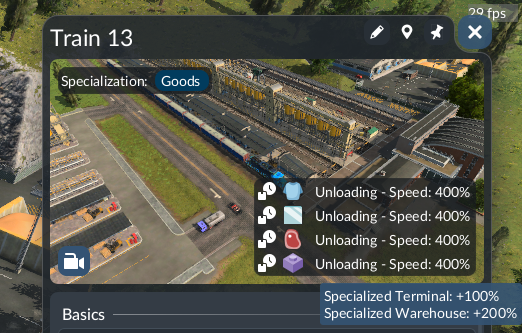
Source image; not a SimGrove play-test. Interface may differ by version or platform.
- Status — The four visible rows say Unloading, each with Speed: 400%.
- Modifiers — The tooltip lists Specialized Terminal: +100% and Specialized Warehouse: +200%.
- Limit — These are values in the official example. Inspect your own panel; they are not our benchmark or a guaranteed route improvement.
A growing queue at a roadside unloading stop
Picture this. Imagine this: trucks reach the same roadside stop but the queue grows. You are deciding whether to replace the stop or increase the fleet.
Record one complete visit
Keep the vehicle and cargo quantity fixed. Separate time in the queue from time spent actually unloading.
Compare one suitable alternative
In a copy of the save, compare a road-station location with valid coverage. Keep the fleet unchanged for this comparison. If the receiver is no longer covered, reject that comparison before judging speed.
Check the queue as well as handling
Repeat the observation after the change. Record whether unloading finishes sooner and whether waiting shifts to the entrance or surrounding road.
What you’re looking for
Keep a layout change only when the whole visit improves under comparable conditions. No percentage improvement is claimed for this untested scenario.
Worth keeping handy: Capture the vehicle’s handling-speed breakdown, receiver coverage and queue before and after. Do not infer your own result from the official screenshot’s 400% example.
Where is the loading-speed information?
The vehicle window reports cargo handling speed; hover a cargo’s loading status for the modifier breakdown. The official image below illustrates that panel. Its percentage is a speed modifier, not a promise that your entire delivery route becomes that much faster.
Check platform length and specialization
The manual identifies short platforms as a cause of slower train and tram handling. Matching vehicle, terminal and warehouse specializations can improve handling; mismatches can reduce it. Check the displayed warning or modifier before spending money. Keep the cargo and vehicle consistent when comparing a change.
Why is a roadside cargo stop so slow?
The station manual says roadside stops handle cargo more slowly than larger road stations. A player help thread describes a growing delivery queue at such a stop. That does not make demolition the automatic answer: first measure where time is being lost and compare a station location that still covers the intended receiver.
Full load any versus full load all
These are departure conditions, not speed upgrades. Full load (any) waits for one cargo type to fill; Full load (all) waits for the whole load. In the unmodified game, the distinction matters for trains and ships with separate compartments. To investigate a wait, compare Load if available on a test save and observe what cargo is actually collected.
Should you buy more trucks?
Not as your first experiment if they already queue at the unloading point. Follow one vehicle from arrival to departure and note whether it is waiting behind traffic, handling cargo or waiting after handling. Add capacity only after identifying which part needs it. More vehicles may increase the queue without explaining the original delay.
Give the new setup a fair comparison
Use the same save, simulation speed, cargo quantity and vehicle. Note arrival, start of cargo movement, end of cargo movement and departure. Change one item, then repeat. Judge the complete visit as well as the handling interval: faster unloading is of limited help if the approach remains blocked. We have not benchmarked a universal speed gain or tested a faster-loading mod.
Player Stories & Experiences: Explore four shared experiences →
Sources & a note on this guide
Reviewed against the linked documentation on 5 November 2026. We used the linked sources to build this walkthrough. The examples are suggested exercises, not records of our own play-testing. Your version, mods or setup may behave differently; a screenshot and a game version help us review corrections.
Does it work differently in your save? Let us know →