Is this vehicle delivering to a customer, or handing cargo over to another service? For a transfer, start with the warehouse’s cargo module and then follow each service separately. Free space somewhere in the building doesn’t tell us whether this particular load can be accepted.
Jump to a section
Start with these three things
Tick each check as you go. Ticks reset when you reload.
Let’s take a closer look
Inspect the module, not only the total
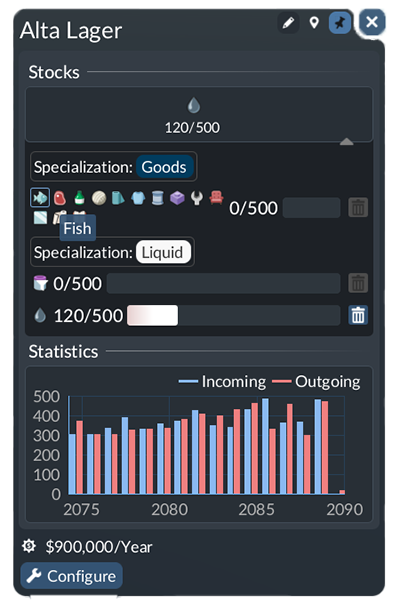
Source image; not a SimGrove play-test. Interface may differ by version or platform.
- Rows — The image separates Goods and Liquid storage. Compare the exact row with the cargo you are diagnosing.
- Selection — The Fish tooltip identifies a cargo icon. This is a reference interface, not evidence that your vehicle can unload.
- Observation — The 120/500 quantity belongs to a particular stock. Do not treat that number as free capacity for every cargo.
A ship unloads, but the truck leaves empty
Picture this. Imagine this: cargo arrives by ship, then should continue by truck through a shared warehouse. You see stock in the warehouse but no load aboard the truck.
Confirm which cargo is present
Open the relevant stock row and write down its exact cargo name. A nonzero total somewhere else in the building does not answer this question.
Inspect collection separately
Compare the truck’s supported cargo and pickup selection with that stock. Inspect the truck stop’s coverage of the warehouse. Keep the successful incoming service unchanged while testing the outgoing one.
Follow the last leg
After one correction, watch the truck collect the intended cargo and deliver it to the actual consumer. Keep the load before and after each visit in your notes.
What you’re looking for
Warehouse receipt, truck collection and consumer delivery are three separate milestones. Confirm each instead of calling a rising warehouse stock a completed supply chain.
Worth keeping handy: Keep the relevant Stocks row, outgoing pickup settings and destination view. This is an illustrative workflow, not a play-test.
What a warehouse does—and what it does not do
The official manual describes warehouses as cargo storage and transfer points. A warehouse must be within a serving station’s cargo coverage; it does not require a road connection of its own. Factories and town buildings do not take goods directly from warehouse stock: you still need transport to the consumer.
Can one warehouse store several types of goods?
Yes, but check the modules. Universal storage accepts a mixture. A specialized module holds one cargo type at a time; sharing a broad category does not make two goods interchangeable. Open Stocks and inspect each module’s cargo selection and available space. The official example uses separate modules for crude oil and fuel.
Watch the arrival, the stock and the pickup
Choose one arriving vehicle and one outgoing vehicle. Record what the arrival carries before and after its visit, then inspect the matching warehouse stock, then follow the collection vehicle. If the arrival still carries everything, investigate receipt. If stock is present but the collection vehicle leaves empty, investigate pickup. Do not change both services at once: you would lose the evidence that tells you which leg failed.
Cargo type cannot be unloaded: where to start
Read the exact warning and identify which cargo and stop it concerns. Compare the destination’s accepted cargo with what is actually aboard. For warehouse delivery, examine the specific module rather than the building’s total free space. For direct delivery, examine the consumer instead. Then use the line guide to inspect the affected stop and its intended onward journey.
Is a conflicting cargo configuration always a bug?
No single cause is established here. A public player report describes vehicles returning full despite apparently available warehouse capacity. That report establishes a symptom, not a verified universal fix. If your settings appear consistent, preserve the save and exact warning; compare a minimal one-cargo connection on a copy. Report what differs between the working and failing cases rather than deleting the entire network.
Why do goods stay in the warehouse beside a town?
Treat the warehouse as an intermediate stop, not the final destination. In your notes, name the intended consumer and the service responsible for the last leg. If you cannot identify that service, your plan has a missing handoff. After adding or correcting it, verify actual collection and delivery; the appearance of a nearby town is not evidence of a completed journey.
Player Stories & Experiences: Explore four shared experiences →
Sources & a note on this guide
- Official manual: Warehouses ↗
- Lines and vehicles ↗
- Player question: what are warehouses for? ↗
- Player report: conflicting cargo configuration ↗
Reviewed against the linked documentation on 5 November 2026. We used the linked sources to build this walkthrough. The examples are suggested exercises, not records of our own play-testing. Your version, mods or setup may behave differently; a screenshot and a game version help us review corrections.
Does it work differently in your save? Let us know →