The official manual describes repairs within maintenance coverage. So start with one vehicle and the route it really takes. The building next to a parallel road might look close, but the useful question is whether your service passes through its repair area.
Jump to a section
Start with these three things
Tick each check as you go. Ticks reset when you reload.
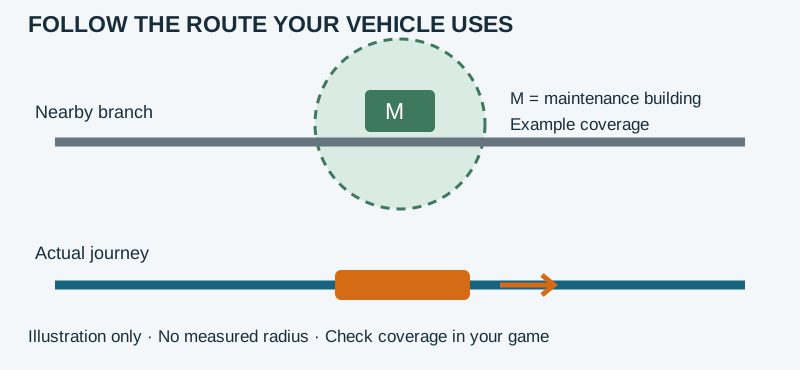
A repair building beside the route, but on the wrong branch
Picture this. Imagine this: a vehicle uses one of two parallel routes. You placed a maintenance building near the route you expected it to take, but have not observed any improvement.
Draw the journey you actually see
Follow one named vehicle and record which branch it takes. Include the approach and return, rather than only its position beside a station.
Make a small comparison
On a copy of the save, compare a suitable building location or route adjustment. Keep the original observation for comparison; do not change the fleet at the same time.
Verify operation and condition separately
Confirm that the vehicle still completes its service. Then compare the displayed condition or repair information over an equivalent observation period. If there is no clear change, record that instead of claiming the repair works.
What you’re looking for
The useful result is evidence that the revised arrangement serves the actual route without breaking the transport service. No tested repair time, radius or savings figure is claimed.
Worth keeping handy: Keep the building, actual route and the same vehicle’s before-and-after information together. This is a proposed test, not gameplay we performed.
How does vehicle maintenance work?
The official manual says depots and shipyards repair nearby vehicles within a small radius. Dedicated maintenance buildings provide a larger area for passing vehicles, but cannot sell vehicles. Use the appropriate building for the transport mode. The manual does not provide a universal radius or repair-time figure here.
Where is the maintenance budget?
A player question specifically asks where to find a maintenance budget. For this guide, the supported starting point is the building-and-coverage system documented in Transport Fever 3. Do not assume that an older game’s budget setting or a modded maintenance regime describes the unmodified game. Identify your game version and active mods before comparing instructions.
Which road is your vehicle really using?
Choose one vehicle and follow a full circuit. Identify the stretch nearest the maintenance building and observe which road, track or water route it actually uses. In a separate save, compare a targeted building-position or route change. Keep the vehicle and other conditions unchanged. Looking at the map from far away can conceal a parallel route that the vehicle never uses.
Does a depot connection prove maintenance works?
No. A valid depot connection lets a newly assigned vehicle reach its first stop. That is separate from whether its regular route passes through maintenance coverage. The official manual calls for connected road or rail depots and navigable water access for shipyards. If a new vehicle never leaves, inspect that access before diagnosing wear or repair.
What about aircraft and helicopters?
The official manual says aircraft have no dedicated maintenance buildings. It identifies airport hangars for buying aircraft and heliport hangars for buying helicopters. Do not interpret the absence of a road-style repair building as a missing unlock. This guide does not establish an exact aircraft repair rate or replacement schedule.
Maintenance building or cloud-service maintenance?
These are different questions. If you cannot launch the game because a streaming provider displays a maintenance notice, editing your transport network will not address it. Check that provider’s service notice. This article concerns vehicles inside a running game, not the availability of a cloud-gaming service.
Before replacing the whole fleet, follow one vehicle
Record the vehicle identifier, any displayed condition or repair information, the building type, the route and the in-game observation period. Compare the same vehicle before and after one change. A visual change or a single trip is not evidence of a universal cost saving. If the result is unclear, keep the save and observations for a support report instead of replacing every vehicle at once.
Player Stories & Experiences: Explore four shared experiences →
Sources & a note on this guide
Reviewed against the linked documentation on 6 November 2026. We used the linked sources to build this walkthrough. The examples are suggested exercises, not records of our own play-testing. Your version, mods or setup may behave differently; a screenshot and a game version help us review corrections.
Does it work differently in your save? Let us know →